
· 3 min read
Client authentication can be done before/after the LWA handshake in the Online Offer CX.

This blog post details the options for doing client authentication before/after LWA handshake in the Online Offer Construct and the Amazon recommended approach.

The customer is asked to perform client authentication after LWA consent page shows up. Client needs to generate the token-pair from the authorization code and keep it temporarily associated to the customer’s session. Once customer performs authentication, client can update the association to reflect the relationship of customer to the token-pair.

Pictorial Diagram
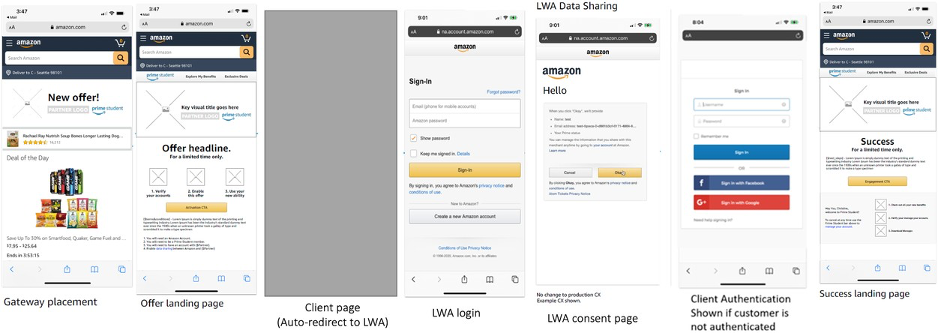
Client Auth after LWA

This approach is focused at giving customers a better CX while taking them from Amazon to the client website.

  • Initiating LWA consent flow at the client side right after customer’s interaction on Amazon retail website seems to be a smooth transition while taking customer from Amazon domain to the client domain. Once LWA flow completes, customer expects to be interacting with the client domain.
  • Since client invokes the LWA consent flow before asking customers to log-in and provide their details at their end, customer is informed very well in advance about the data-sharing policies between Amazon and the client.

Prerequisites

There are certain prerequisites to follow this approach, which are listed in the LWA Integration guide here.

2. Client authentication before LWA handshake

The customer is asked to perform client authentication before LWA consent page shows up. Since authorization code has an expiry of 5 minutes and if customer takes longer than that to perform authentication/login at the client end, then client needs to initiate LWA handshake again to get a new authorization code and exchange it for the token-pair (access token and refresh token).

If LWA handshake is supposed to happen before client authentication, then client needs to generate the token-pair and keep it temporarily associated to the customer’s session till customer logs in.

If customer is already logged in at client’s end, then it doesn’t really make a difference since customer is not asked to perform authentication by client.

Pictorial Diagram
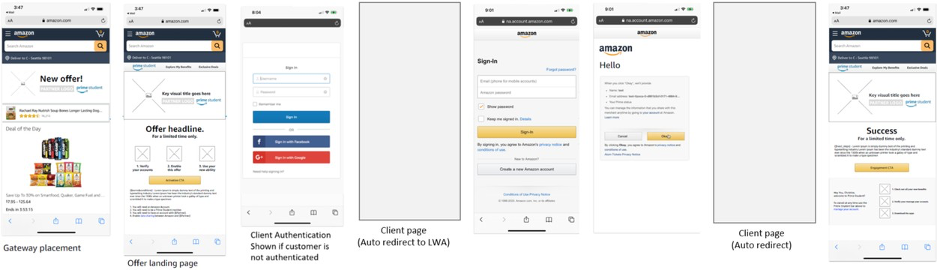
Client Auth before LWA

We feel the CX in this approach is not as good as compared to the previous approach for following reasons:

  • When a customer is taken from Amazon website/app to the client website/app, one expects that the interaction with Amazon is over and now completely moved to the client domain. However, if customer is not logged-in already at the client side, then customer is asked to perform the authentication at the client end before being asked for consent on the LWA screen.
  • The CX may appear confusing to the customer. However, with proper messaging at the client login screen or the wait screen before LWA handshake is initiated, customer can be informed about what to expect next in the flow.

This approach should be considered in those cases when:

  • Client does not own a data store to associate the customer’s session to the token-pair generated after LWA handshake.
  • It is too much of an overhead for the clients to create and maintain this data store.

· 3 min read
Avoid usage of WebViews for Mobile integrations.

This blog gives a high level overview of the recommendation from Amazon on the processes to be followed by 3P Partners for integrations with Amazon Webpages in mobile platforms such as Android and ios.

The below section details the reasons related to advisory on avoiding usage of webviews by 3P partners for showing Amazon webpages such as Login with Amazon (LWA) or other Prime specific pages as applicable.

  1. By implementing WebViews, a mobile application may become vulnerable to XSS, JavaScript Injection, Insecure Direct Object References, and Path Traversal attacks. With those known vulnerabilities, the attack surface also expands to include Adversary in The Middle, Cache Control, Deeplinking, Bridging, and Runtime related vectors.

    • JavaScript Injection happens when the runtime injects malicious JS into the WebView.
    • Path traversal attacks aim to access files and directories outside of the WebViews scope.
    • Bridging and Runtime attacks result from JavaScript sending data to the JS Bridge that causes Arbitrary code execution (https://en.wikipedia.org/wiki/Arbitrary_code_execution) or accessing sensitive or restricted data/permissions/classes. JS Bridge functions are exposed to the entire WebView.
  2. As part of the recommendations from RFC related to OAuth (RFC8252 - https://datatracker.ietf.org/doc/html/rfc8252#section-8.12), usage of webviews is not advised due to the following key reasons:

    • In typical web-view-based implementations of embedded user-agents, the host application can record every keystroke entered in the login form to capture usernames and passwords, automatically submit forms to bypass user consent, and copy session cookies and use them to perform authenticated actions as the user.
    • Even when used by trusted apps belonging to the same party as the authorization server, embedded user-agents violate the principle of least privilege by having access to more powerful credentials than they need, potentially increasing the attack surface.
    • Encouraging users to enter credentials in an embedded user-agent without the usual address bar and visible certificate validation features that browsers have makes it impossible for the user to know if they are signing in to the legitimate site; even when they are, it trains them that its ok to enter credentials without validating the site first.
  3. Amazon is going through a planned change to specifically restrict Amazon pages including Prime owned pages through WebViews. This is applicable for all Amazon pages in future with these changes being planned from Q3 2022. This includes restricting customer logins through pages opened in webviews in mobile platform. It is highly advised that external partners integrate with the recommended browser based solutions such as implementing solutions with either mobile browsers or through Custom Chrome tabs in Android/Safari View controller in ios.

  4. Apart from the Security reasons, Customers will also experience reduced friction while using browser based solution as custom chrome tab/safari view controller will not only save the cookies (unlike web view), but they also share the cookies with browsers such as Chrome/Safari. For Workflow pages as in Prime Signup use cases, this will help to avoid re-login if a customer is already logged in on mobile browser. Also, debugging in WebView is difficult and outdated. Browser and Custom tab/safari view controller uses the latest mechanism and are deeply integrated with OS to allow the easy debugging using standard tool (Example: chrome://inspect/#devices will allow debugging in Chrome Custom tab as well).