Prime Notification System
Prime Notification System leverages Amazon SNS to easily push real-time notification messages to our 3P Partners regarding Prime members engaging with 3P provided exclusive offers and benefits. These messages or events enable our 3P Partners to take appropriate actions and continue to provide Prime members the best customer experience.
One of the key aspects required by this event notification system is the data related to mapping of an Amazon customer on the 3P client side. This is essential in accurately notifying 3P clients on the changes in Prime member’s benefit state.
Please refer to Account Linking API integration guide here to link and maintain this mapping relationship before starting Notification System onboarding.
Notification System
Through this system, Prime informs clients for any event of interest. Some of the identified events of interest for Phase 1 are as follows:
- Customer benefit deactivation (Change in Customer’s Prime state).
- Customer consent revocation (Change in LWA/APay consent status for Prime scope).
Overall interaction between Amazon and clients is represented by the following diagram:
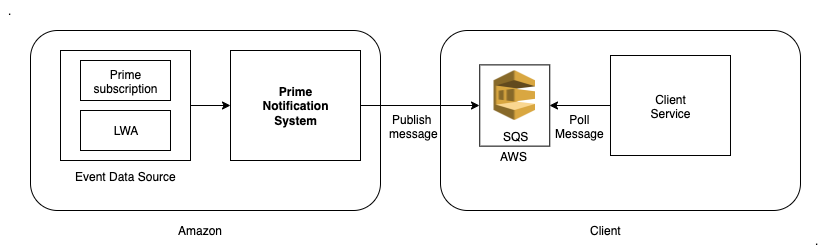
Prime gets the consent revocation and prime subscription change events from internal event sources. Using this data, Prime systems determine if the event notification needs to be sent to client or not. Once Prime systems decide that the event is relevant for the client, Prime sends the notification to client owned SQS.
Some of the important information that would be available in the notification message is listed below.
- ClientCustomerId: This is same ClientCustomerId that clients need to send as part of Account Linking API.
- EventType: EventType is the type of event.
- PrimeStateChangeEvent - When Customer changes their Prime membership state
- ConsentRevocationEvent - When Customer revokes their LWA consent
- AmazonPayConsentRevocationEvent - When Customer revokes their APay consent for Prime scope
- EventData: This holds the main information about the event.
- Other details like date and eventId.
Once client gets this notification about a customer changing its state, they need to invoke our Benefit Discovery API again to check if the customer is still eligible for the 3P offer or not.
Onboarding Steps
Since we are using SNS + SQS system to push messages to the SQS, the onboarding steps are as follows:
- Prime creates a client specific SNS Topic and provides its ARN for clients to subscribe.
- Clients create SQS Queue(s) and provide its ARN for Prime to allow list for creating subscription.
- Once the allow listing is done, clients can follow this doc to subscribe to the notifications.
Message Format
Main Message
{
    "clientCustomerId" : "<UUID>",
    "eventType" : "<eventType>",
    "marketplace" : "US",
    "notificationMetaData" : {}
}
| Field | Data Type | Description |
|---|---|---|
| clientCustomerId | String | Customer identifier for third party clients. |
| eventType | Enum | PrimeStateChangeEvent/ConsentRevocationEvent/AmazonPayConsentRevocationEvent will be the type of event which has led to the notification roll out. |
| marketplace | String | Marketplace of the customer. |
| notificationMetaData | Map<String, Object> | Notification metadata, if any. |
SQS Message
{
    "Type" : "Notification",
    "MessageId" : "5758e351-cd0d-592c-98df-b8e40255013d",
    "TopicArn" : "arn:aws:sns:us-east-1:882939644104:NotificationInfrastructure-beta-NA-xyz
    "Message" : "{\n \"clientCustomerId\" : \"<UUID>\",\n \"eventType\" : \"PrimeStateChangeEvent\",\n \"marketplace\" : \"US\",\n \"notificationMetaData\" : \"{}\"\n }
    "Timestamp" : "2022-10-04T06:05:12.018Z",
    "SignatureVersion" : "1",
    "Signature" : "JoVyR31d0U/iWo/hgqerVpQM1cnoR3Rkom8L5bX3SjervQ9EUONObaOEzPERhh1tqV7vo
    "SigningCertURL" : "https://sns.us-east-1.amazonaws.com/SimpleNotificationService-56
    "UnsubscribeURL" : "https://sns.us-east-1.amazonaws.com/?Action=Unsubscribe&Subscrip
}
Note: Clients need to parse the main message from the SQS message by parsing the Message field from above.
User Stories
User Story 1 is the baseline CX and API calls when a Prime customer enters redemption CX for the first time.
| User Story | Amazon Notify 3P? | Prime Notification Event Type | 3P calls Benefits Discovery API? | 3P CX Impact | 3P calls Account Linking API? | Linking Status | Prime CX Impact |
|---|---|---|---|---|---|---|---|
| As a Prime customer, I redeem Prime x 3P benefit | No | N/A | Yes | Prime x 3P benefit is activated | Yes (benefitStatus: Active) | Linked | On next visit, Customer is identified as 'Redeemed' Prime member. |
| As a Linked & Redeemed Prime customer, I cancel my Prime membership | Yes | PrimeStateChangeEvent | Yes | Prime x 3P benefit is cancelled | Yes (benefitStatus: Inactive) | Linked | On next visit, Customer is identified as Non Prime member. |
| As a Linked & Redeemed Prime customer, I revoke my LWA consent | Yes | ConsentRevocationEvent | No | Prime x 3P benefit is cancelled | No | Unlinked | On next visit, Customer is identified as 'Unredeemed' Prime member. |
| As a Linked & Redeemed Prime customer, I revoke my APay consent for Prime scope | Yes | AmazonPayConsentRevocationEvent | No | Prime x 3P benefit is cancelled | No | Unlinked | On next visit, Customer is identified as 'Unredeemed' Prime member. |